TroubleshootingAll docs
Members aren’t getting emails
Members say they never get a welcome email, a password reset or a reply notice. Start with a test email: it tells you what’s wrong in plain words.
Send yourself a test email
In your community, open Settings, then Email, and press Send a test email. It goes to your own admin address. If the button is greyed out with Save your changes first., save, then press it again.
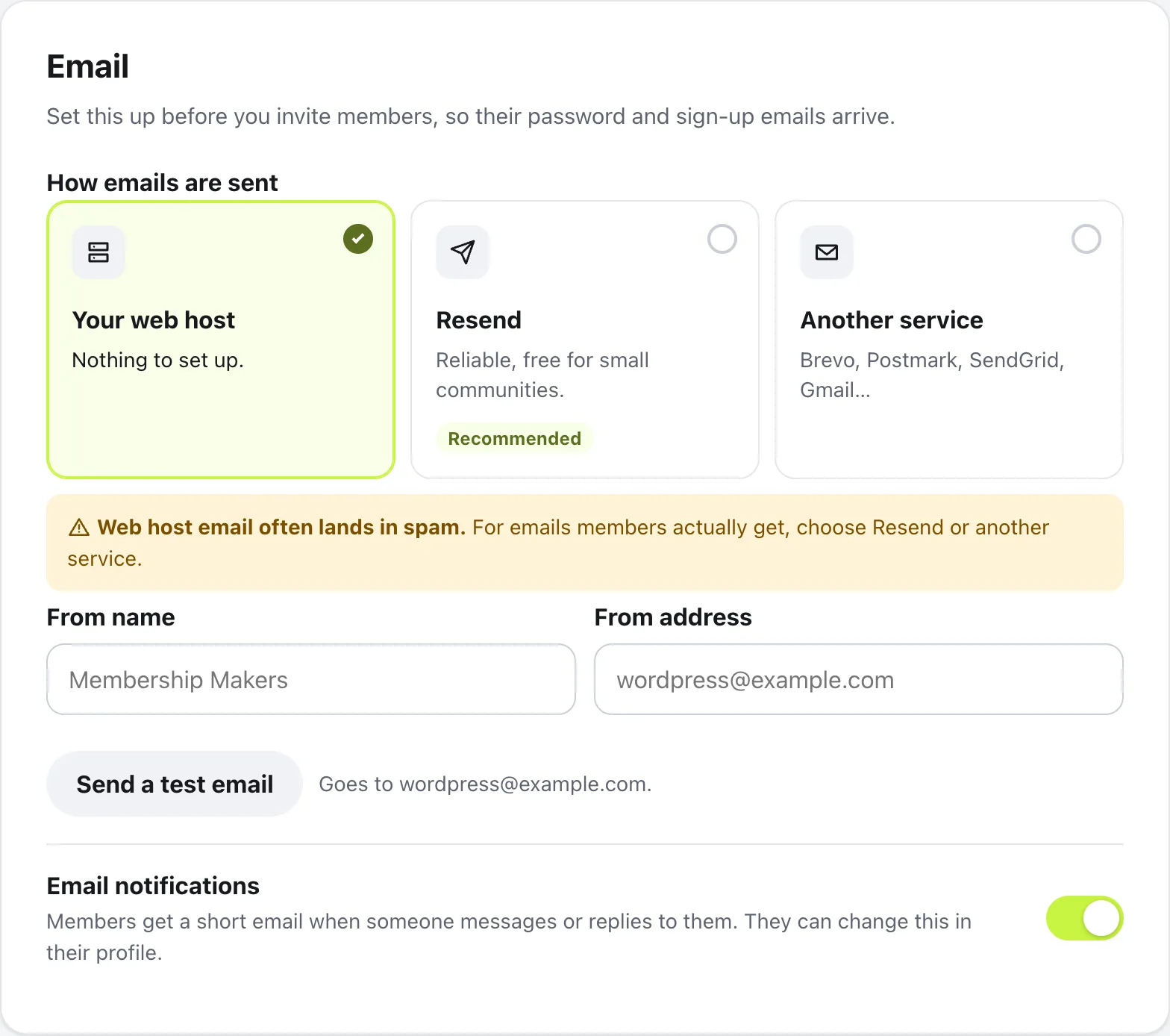
One of three things happens:
It arrives in your inbox
Email works. Skip to One member only, below.
It arrives in spam
Members’ emails are landing there too. This is the most common cause. Connect Resend, below.
The email didn’t send.
A red box says why, in one line. Details for your host, under it, has the exact error to copy and send to your host.
Fix how emails are sent
Out of the box, emails go through your web host, and many hosts send slowly, to spam, or not at all. Under How emails are sent, choose Resend (marked Recommended) or Another service, like Brevo, Postmark, SendGrid or Gmail.
For Resend, create an API key at resend.com with Sending access, paste it in Resend API key, and verify your domain in Resend. Then set From address to an address on that domain, save, and send the test again. If the test still fails, the red box says one of these:
Your web host didn’t send it. Many hosts block email from websites.
Your host’s mail isn’t working for the community. Choose Resend, below, instead.
Resend didn’t accept the key.
Copy the whole API key from Resend again and paste it in Resend API key.
Resend won’t send from your address yet.
Add your domain in Resend first, then use an address on that domain in From address.
We couldn’t reach Resend, or your email server.
For Resend, ask your host to allow outgoing email on port 465. For another service, check the server name and port.
Your email server said the username or password is wrong.
Check them with whoever runs your email.
Also check that Email notifications, at the bottom of the Email settings, is on. With it off, members aren’t emailed about messages and replies, and their Emails you get page says the community doesn’t send emails right now.
When only one member misses emails
If your test arrives but one member says they get nothing, check these.
- Their choice: in their profile, Emails you get may be set to No emails, or have Messages or Comments and replies switched off
- They haven’t confirmed their address: new members get a welcome email with a button to confirm it, and activity emails wait until they press it. After a few days, Home shows them Confirm your email to get updates, with a way to send it again
- Their spam folder, and their address on their profile
Password resets and sign-in emails always go, whatever the member chose.
When emails arrive hours late
Reply and message emails go out on a schedule, about every 15 minutes, or once a day for members who chose that. WordPress only runs its schedule when someone visits the site, so on a quiet site they can go out late.
In WordPress admin, open Tools, then Site Health, and look for Community emails can be sent on schedule. If it says scheduled tasks are running late, or that the built-in scheduler is turned off, ask your host to run wp-cron.php every 5 to 15 minutes.
Questions
Does the plugin keep a list of the emails it sent?
No. To check that email works, use Send a test email in Settings, then Email. If you use Resend or another service, its own dashboard shows what went out and what bounced.
Do password reset emails go through Resend too?
Yes. Password resets and the other account emails the community sends use the delivery you chose in Settings, then Email. The rest of your site’s email is left as it is.
I already use WP Mail SMTP or FluentSMTP. Do I need Resend?
No. Leave Your web host chosen. Settings shows Emails will go through, with the name of your plugin, and community emails follow its settings.
Why didn’t a member get an email about a reply they already saw?
On purpose. Members who used the community in the last few minutes aren’t emailed about it, because they’ve seen it in the app.
Stuck, or something not right? Email us and we’ll help.