Moving inAll docs
Import from BuddyBoss, BuddyPress, PeepSo or FluentCommunity
Bring your members and their history into MemBuild Community, even with the old plugin switched off. You check everything first, and you can undo it.
Before you start
In your community, open Settings, then Import. Any of these four plugins whose data is on your site shows up here with its numbers, switched on or off.
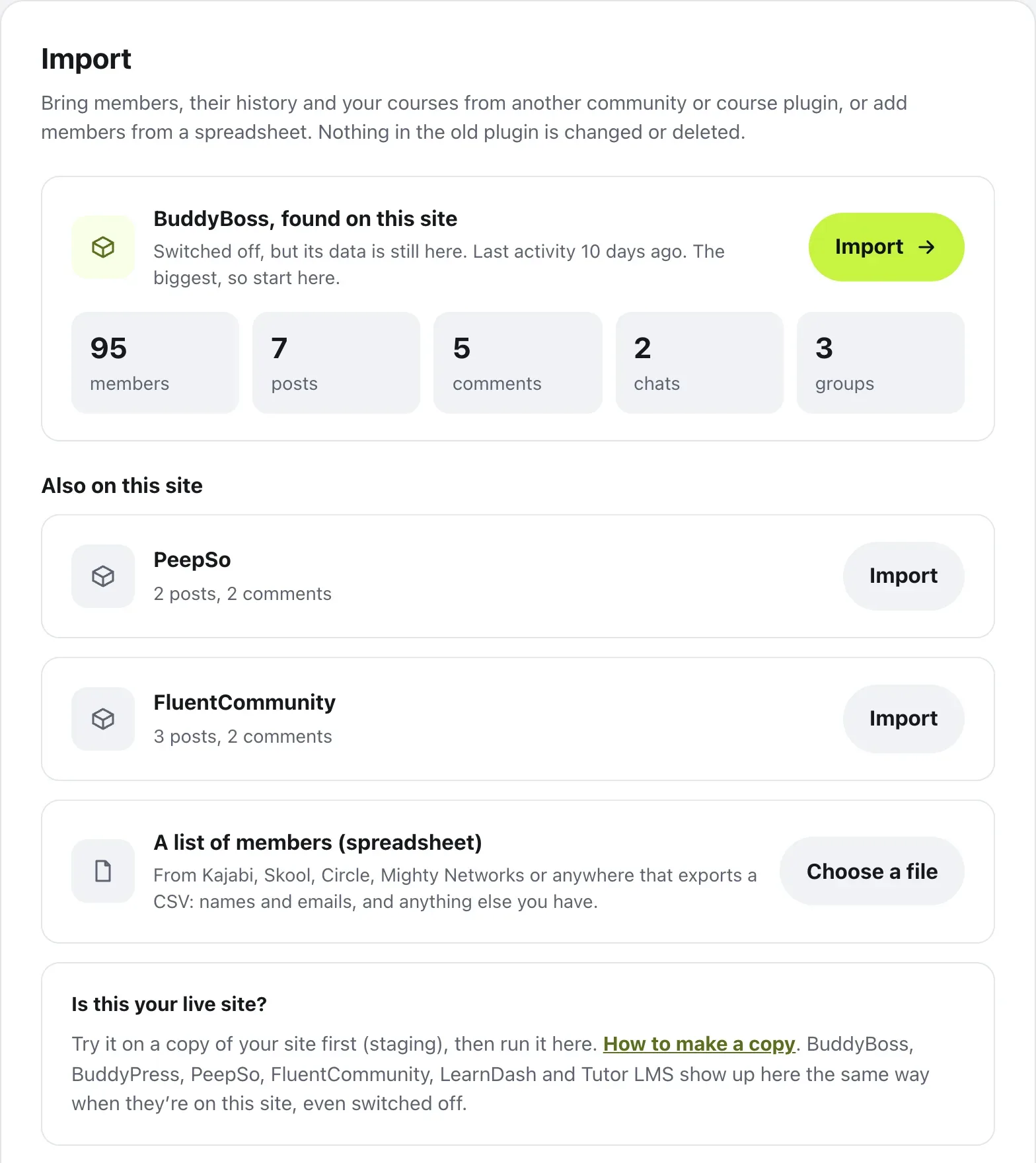
On a live site, try it on a copy first. Press How to make a copy for the steps: back up, make a staging copy, import there and look around, then run Import on your live site. Don’t copy the staging site over the live one, or posts written in the meantime are lost.
Choose and check
What can come along depends on the plugin:
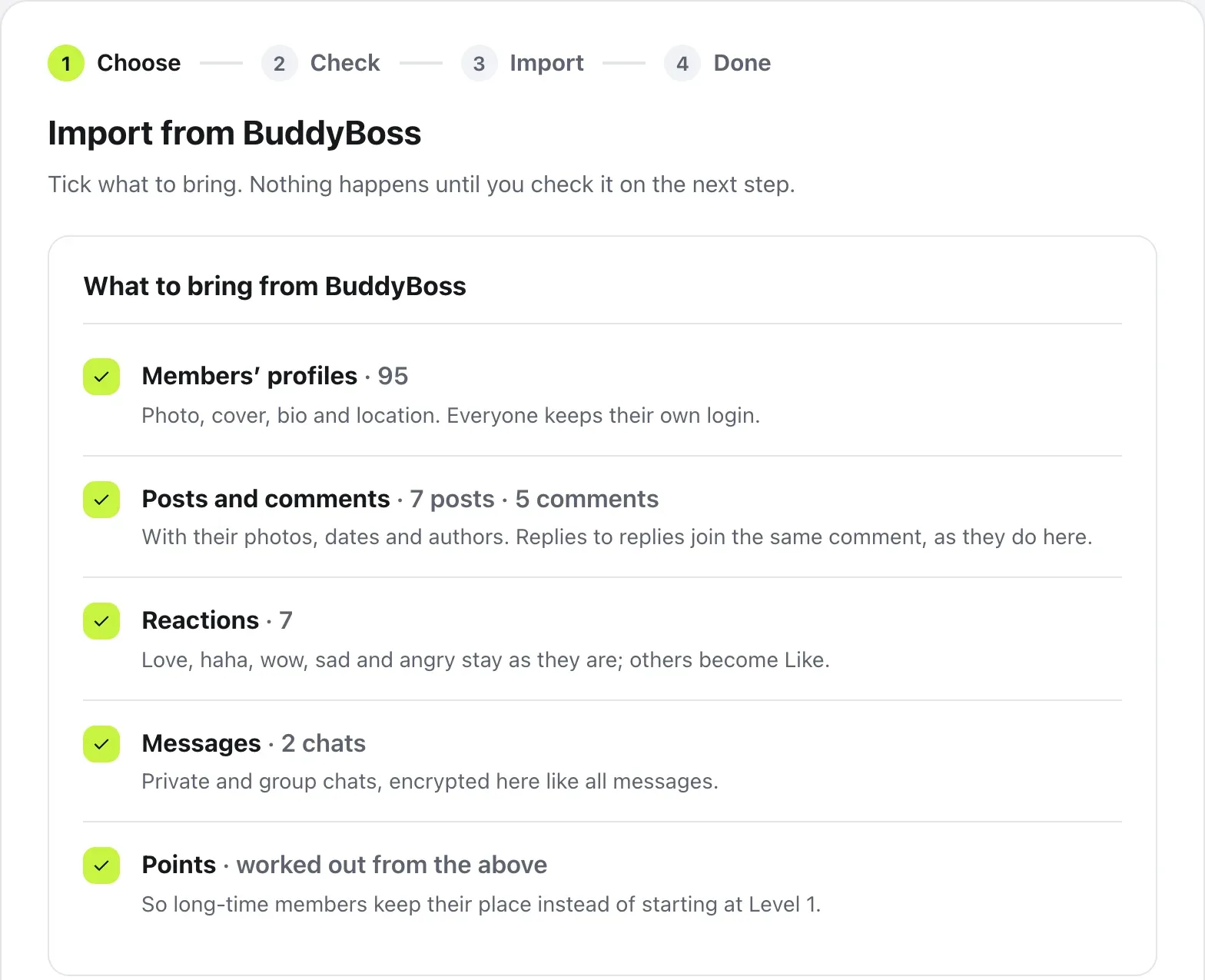
- Members’ profiles: photo, cover, bio and location
- Posts and comments, with their photos, dates and authors
- Reactions: ones that exist here, like love, haha and wow, stay as they are, and others become Like
- Messages: private and group chats, encrypted here like all messages
- Groups (spaces in FluentCommunity), which become topics
- Courses from FluentCommunity, with each member’s progress
- Points, worked out from all of the above, so long-time members keep their place
- 1
Press Import
Import is listed for the plugin you found. If there’s more than one, the one with the most members has the main button, and the rest are under Also on this site.
- 2
Tick what to bring
Each thing shows how many there are. Nothing happens on this step.
- 3
Press Check first
A dry run: nothing changes. Before anything moves lists what will happen, and Worth knowing points out anything to look at.
- 4
Press Start importing
It runs in the background, one step at a time, each with its own progress bar.
Each group becomes a topic of the same name with its posts in it, so members can filter Home by it. A private group becomes a members-only topic, with a membership for the same people, so only they see those posts.
While it runs, and after
Members can use the community while it runs. You can close the page: you get an email when it’s done. Pause stops it, and Resume carries on.
When it’s done, Your community is here shows what came over. From there you can press See your community, Write a welcome post, or Email everyone to tell members. That email goes out slowly, about 200 an hour, so it isn’t marked as spam. Then switch the old plugin off with Go to Plugins. Its data stays in the database.
Questions
Does the old plugin need to be switched on?
No. Import reads the old plugin’s data straight from your database, so it shows up in Import even when the plugin is switched off. Keep its data where it is until the import is done.
Do members need new passwords?
No. Everyone keeps their own login, and their passwords don’t change. When it’s done, Email everyone sends one email from you with a link to log in.
Will old posts fill the top of Home?
No. Posts come in under their original dates, in their original order, so they sit where they belong in the feed.
Can I import again later?
Yes, any time. Importing again only brings what’s new since the last time.
Is anything in the old plugin changed?
No. Nothing in the old plugin is changed or deleted. When you’re happy, you can switch it off from Plugins in WordPress.
Stuck, or something not right? See Troubleshooting, or email us and we’ll help.