Paid add-onsAll docs
Add a paid add-on
Buy the add-on, paste your key in Settings › Add-ons and press Install. It takes about a minute, and the key covers your live site and one test copy.
Buy it and get your key
Each paid add-on has its own page on membuild.com. The first one is CRM Connect, $69 a year. You pay with PayPal, and PayPal renews it each year. Not right for you? Money back within 14 days.
After you pay, the Thank you page shows your key with a Copy button. We also email it to the address you used with PayPal, with your PayPal receipt, so there is no need to write it down.
Paste the key and install
- 1
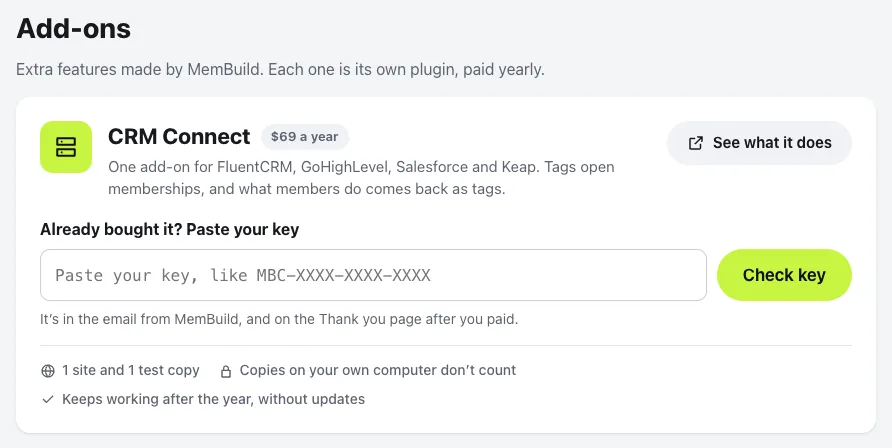
Open Settings › Add-ons
In your community. You need to be the owner. Each add-on is listed with its price and See what it does.
- 2
Paste the key and press Check key
Paste it in the box under Already bought it? Paste your key. It says Your key works, with the date your updates and help run until.
- 3
Press Install CRM Connect
About 20 seconds. You can leave the page, it finishes on its own. Then press Open CRM Connect and pick your CRM.
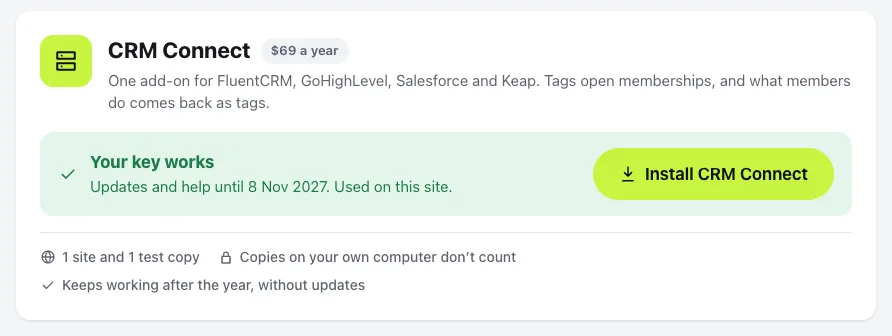
While it installs you see each step: getting it from MemBuild, checking it really comes from MemBuild, putting it on your site, and switching it on. Once it’s on, the add-on gets its own place in Settings, like CRM for CRM Connect.
If the key isn’t found, check it against the email from MemBuild, or press Email me my key. If it’s already used on another site, see moving the key below.
If your host blocks the install
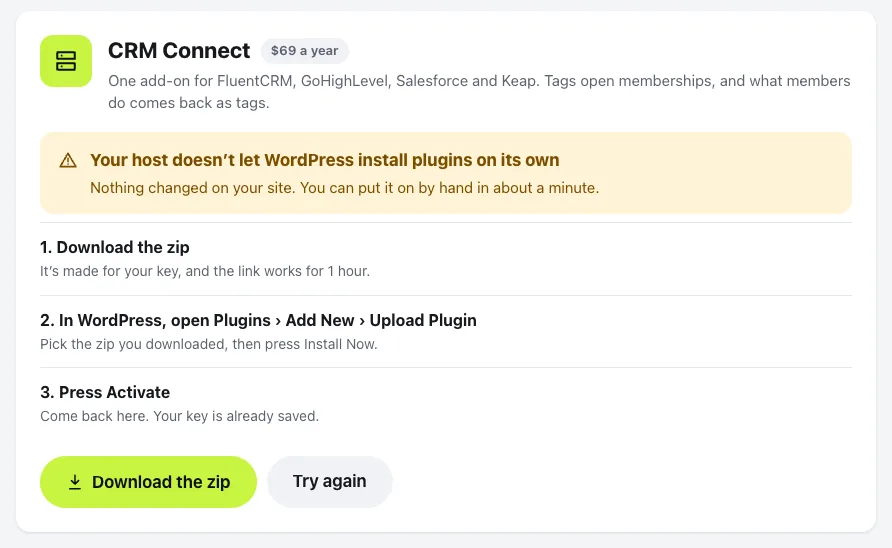
Some hosts don’t let WordPress install plugins on its own. Settings › Add-ons tells you so, and nothing changes on your site. You can put it on by hand in about a minute:
- 1
Download the zip
It’s made for your key, and the link works for 1 hour.
- 2
In WordPress, open Plugins › Add New › Upload Plugin
Pick the zip you downloaded, then press Install Now.
- 3
Press Activate
Come back to Settings › Add-ons. Your key is already saved.
Your test copy and your own computer
One key covers 1 live site and 1 test copy. Copies on your own computer are free.
- Your live site. The first site where you check the key becomes the live site.
- A test copy. A copy of the same site, like staging.groundwork.community for groundwork.community. Paste the same key there and it says it’s the test copy. Updates come there too. A copy of a different site needs its own key.
- Your own computer. Copies like groundwork.local can’t be reached from the internet, so they never count.
Once it’s installed, Settings › Add-ons shows your key and where it’s used. Press Remove beside the test copy to free it for another one. If your key already has a test copy, a new one asks you to Use it here instead, and the old one stops getting updates.
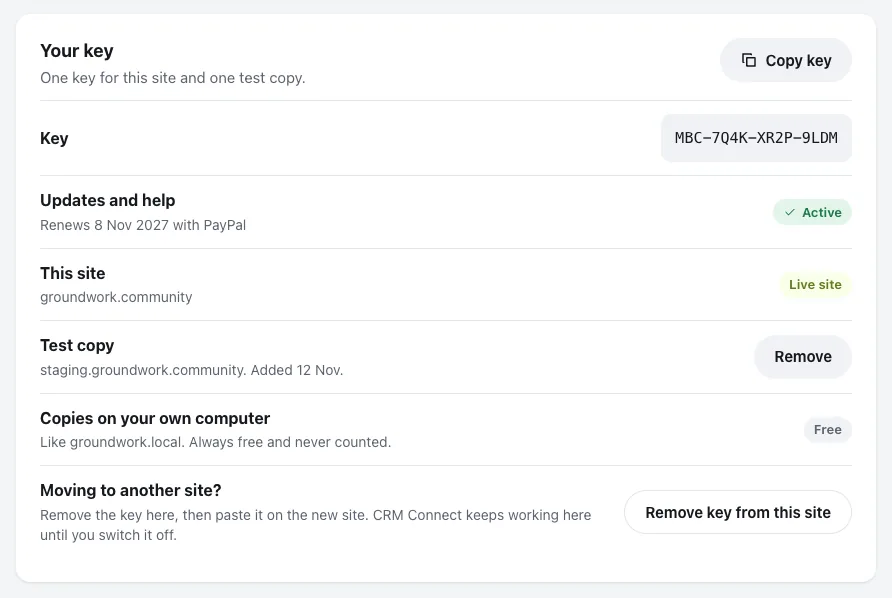
Moving to another site? Press Remove key from this site, then paste the key on the new site. The add-on keeps working on the old site until you switch it off there.
If you paste a key that’s used somewhere else, it says This key is already used on that site, with Move the key here. The old site stops getting updates and help, but the add-on keeps working there and its members notice nothing. A key can move 3 times a year.
Each year
PayPal renews it by itself. Settings › Add-ons says Renews soon before the date, there’s nothing to do, and we email you a week before. Manage on PayPal takes you there if you want to change anything.
If PayPal can’t take the renewal, it tries again for 10 days and everything carries on as normal until then.
If you don’t renew, updates and help run until your renewal date. After that the add-on keeps working on your site; you just don’t get the latest updates and help any more. Press Renew for $69 a year to get them again.
The add-on looks for updates once a day while your updates are active.
Lost your key
Your key is in the email with your PayPal receipt. Can’t find it? Open Lost your key, type the email you used with PayPal and press Email me my key. If it has a key, we send it there in a minute.
Once the add-on is installed, you can also see your key in Settings › Add-ons and press Copy key. Still stuck? Email [email protected].
Next: set up CRM Connect.
Questions
Do I need MemBuild Community first?
Yes. A paid add-on adds to the free MemBuild Community plugin and does nothing without it. Each add-on is its own plugin, paid yearly.
What happens if I don’t renew?
The add-on keeps working on your site after your renewal date. You just don’t get the latest updates and help any more. Renew any time to get them again.
Do copies on my own computer count?
No. Copies like groundwork.local can’t be reached from the internet, so they are always free and never counted.
Can I get my money back?
Yes, within 14 days. Email [email protected].
PayPal couldn’t take my renewal. Does it stop working?
No. PayPal tries again for 10 days, and everything carries on as normal until then. Check your card in PayPal.
Stuck, or something not right? See Troubleshooting, or email us and we’ll help.